


Preference Toolbar Icons
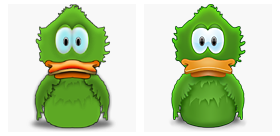
Old/New Comparison
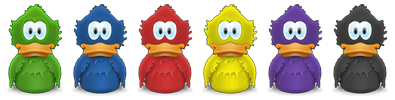
New Colors
Head over to Phillryu.com blog for Adiumy Icons download link.
Here’s a photoshop file if you want to play with different colors. Includes some sample colors and level control. Level is mostly used for bright color.


Wow, this is one beautiful duck.
WBjr
Beautiful, thank you Adam.
You are such a great designer! Your work is useful and inspiring. Thank you for sharing your talents!
Best duck I’ve ever seen in my life.
WOW!
Great stuff Adam.
I have a couple of questestions that i wanted to ask you but they are private so please e-mail me :) thanks!
Great work…
Thank you very much Adam!
I’m very pleased to see that you still have the time to work on this very nice app.
Your work is great!
Great icons, love them!
I was wondering if you could make a white and a gray dock icon. I’ve been tinkering with the colours, but all I can do is change hue and saturation. Working with replace colour also doesn’t give me any good result…
You can get gray color easily by entering H: 0, Saturation: 0 and Lightness: 0. Use with level layer for brighter gray if you want.
White is a little more tricky since it’s too bright, you really need level layer if you don’t want to lose body gradient and self-shadow. You can also use other adjustment layers for better result.
you should make a system replacement if you have the time that matches this new style. It looks gorgeous in my Dock Adam. Bravo ;)
Hi,
congratulations on your work. I have downloaded the new adiumy duck, but I couldn’t find a link to the toolbaar icons. Are they available anywhere? (apart from the two included in the package).
Thanks a lot
You can download full set from here:
http://phillryu.com/2006/07/11/pim...
If you’re talking about non-preference toolbar icons, I haven’t done them yet. I want other artists to have a chance of making their own icons for non-preferences toolbar icons.
Awesome icons Adam! The only problem is the status icon can’t really be used due to localization, and some of them could be confusing to some users, then again there is text under each icon saying what each section is.
Yeah I realized about localization after I made the icon. I’ve already changed them from text (Away) to graphic and various toolbar icons are also changed. It should be in Adium beta sometime soon if all developers approve.
Great job! I miss the old duck a little bit, though – I feel really stupid asking this, but where can I find the full set of old ducks (that came with the application).
Thanks again – you are extremely talented!
Hello, will you update the Adium’s icon soon ?
Because, this icon is in 128*128, it’s pity because in Leopard, we can see icons in 512*512. With the Cover Flow mode, it’s more beautiful without pixels ! Bye, Ju
Hello Adam!
My 2 years old son loves your amazing duck icon so much!
Can you send it to me in vector curves so i can print and present him? ^__^
Mike Tansky
@Mike
Glad to hear that :)
I’ve sent the files (although not vector) to your email address.